
Benchmarks
Numbers here are measured, with the method and raw results in the open, so you can check them on your own hardware.
Renderer: sprites at 60 fps
A "bunnymark": N bouncing 16×16 textured sprites with a deterministic simulation. Each frame is timed from simulation through GPU completion, so vsync can't hide cost. The score is the largest count on a doubling ladder (1k, 2k, 5k, 10k, 20k, 50k, 100k, 200k, 400k) whose frame fits in 16.7 ms.
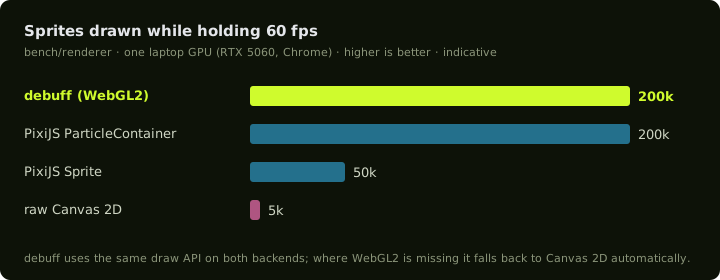
| Renderer | Max at 60 fps | Frame at 10k | Frame at 50k | Frame at 200k |
|---|---|---|---|---|
debuff draw.sprite (WebGL2) | 200,000 | 0.8 ms | 3.1 ms | 13.9 ms |
PixiJS v8 ParticleContainer | 200,000 | 1.0 ms | 1.6 ms | 10.4 ms |
PixiJS v8 Sprite | 50,000 | 5.1 ms | 14.0 ms | — |
Canvas 2D drawImage | 5,000 | 21.9 ms | — | — |
| debuff Canvas 2D fallback | 5,000 | 22.4 ms | — | — |
Ladder runs, 2026-10-16: Windows, Chrome, NVIDIA GeForce RTX 5060 Laptop GPU (ANGLE / Direct3D 11).
Reading it fairly
- One machine, indicative. GPUs, drivers and browsers vary a lot. Treat the ratios as the signal, not the absolute numbers.
- PixiJS's ParticleContainer is faster per frame at high counts (10.4 ms against 13.9 ms at 200k), and both top out on the same ladder step. ParticleContainer is a specialised path with restrictions on what each particle can do. debuff reaches that level through its ordinary, general-purpose
draw.sprite, so every sprite in your game gets it without a special container. - Against PixiJS's regular
Spriteand raw Canvas 2D, debuff holds about 4× and 40× more sprites at 60 fps. - The Canvas 2D fallback is only used where WebGL2 isn't available. It's as fast as hand-written Canvas 2D, not faster.
Reproduce it
The benchmark lives in the debuff repository (bench/renderer) and runs headless in your installed Chrome or Edge:
git clone https://github.com/debuffjp/debuff
cd debuff
npm install
npm run build
npm run bench:renderer
Results are written to bench/renderer/results/ with your GPU string. Results from other devices are very welcome as pull requests. The design and caveats are recorded in ADR 0007.
Try it in your browser
The plinko demo has a stress test button that keeps adding sprites while your device holds 60 fps, then shows the count it held.
Size
The starter game from npm create debuff builds to about 13 kB brotli, everything included (runtime, input, audio, juice and the game). debuff build prints the raw, gzip and brotli size of every file, and fails if dev tooling leaks into the build.