
Komadori
A 10 s 1080p clip of a million boids takes 11-14 s to make. You can't watch a canvas run from a terminal, and neither can your agent. Komadori runs the page one frame at a time and hands back what it drew: a clip, a contact sheet, a report.
A million boids from spryte's demo, as a clip made by Komadori with --capture canvas. A 10 s clip at 1080p took 11-14 s to make on a Radeon 780M and an RTX 5060 laptop. This copy is 720p.
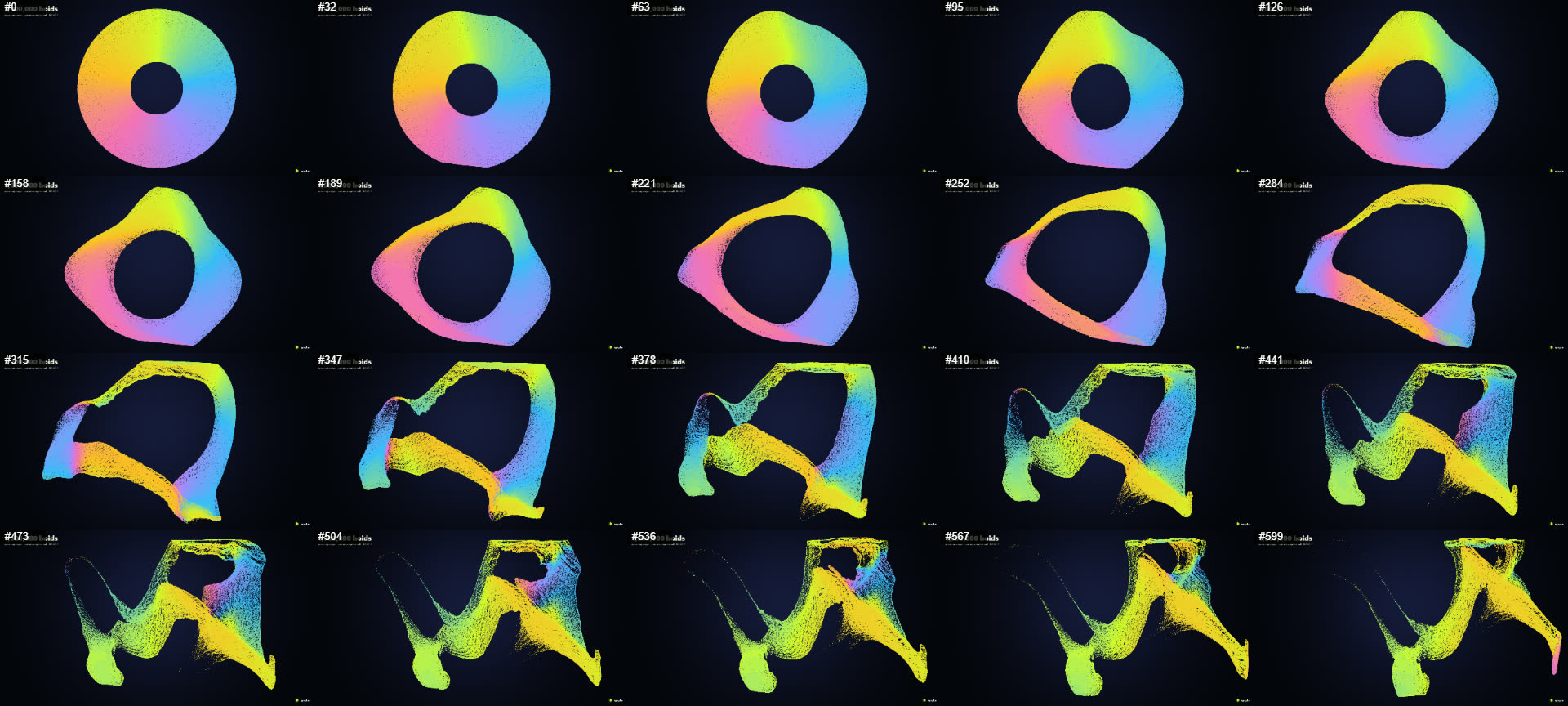
The contact sheet from that run: 20 sampled frames in one image, written next to the report.

A golden frame that failed: the saved frame, the new one with its stars recoloured, and the difference. 16% of the pixels changed.
コマ撮り (Komadori) is Japanese for stop-motion. Komadori runs your page in Chrome, moves it forward one frame at a time, and writes a contact sheet (one image of sampled frames) and a report. With --mp4 it also writes a clip. It was made for spryte scenes and works with any page that draws on a canvas.
npx komadori dist --frames 600 --size 1920x1080 --out render --mp4 render/clip.mp4dist is a built folder or a URL. Komadori needs Node 20, Chrome or Chromium, and ffmpeg for --mp4.
Give the page a frame function
Komadori steps your page through one function, window.__frame(). It has to advance the scene by exactly one frame and draw it. Keep the normal loop for people, and add the stepped mode behind a query string:
if (new URLSearchParams(location.search).has("capture")) {
  window.__frame = () => {
    step(1 / 60);
    render();
  };
}npx komadori dist --query "capture=1" --frames 600Use a fixed step of 1/60 s, so a clip plays at the speed you meant whatever the machine does. Seed any randomness, so two runs give the same frames. spryte's million-boid demo is a working example.
What it checks
A run fails, with exit code 1, when:
- the page throws an error or a request fails
- a shader doesn't compile. The message gives the line of your shader source, the compiler's message and the line itself.
- every sampled frame is one flat colour, or the frames barely change
It warns when content touches an edge and may be cut off. Exit code 2 means the render couldn't run, for example because the page never defined window.__frame().
It can't see stripes, text that is hard to read, or ugly colours. Open contact-sheet.png and look. --keep-frames dir saves each sampled frame at full size.
Clips
--mp4 takes a screenshot of the whole page for every frame. --capture canvas encodes the canvas inside the page instead, and is about 3x faster (2.6-3.6x across runs). A 10 s 1080p clip of spryte's million-boid demo took 11-14 s on a Radeon 780M and on an RTX 5060 laptop, in Chrome on Windows.
npx komadori dist --query "capture=1" --frames 600 --size 1920x1080 --mp4 clip.mp4 --capture canvasThe clip holds only the canvas, so a title or logo drawn in HTML over it is missing. If Chrome can't encode H.264 at your size, Komadori stops and says so.
Golden frames
A golden frame is a saved picture of how a scene should look. Later runs fail when a frame no longer matches.
npx komadori approve dist --frames 120 --samples 5 --size 1280x720 --golden golden
npx komadori dist --frames 120 --samples 5 --size 1280x720 --golden golden
approve renders the scene twice and saves the frames only if both runs match. A failing frame is reported with its number, the share of pixels that changed and the region, and Komadori writes an image of the golden frame, the new frame and the difference. approve won't replace existing golden frames unless you pass --yes.
On the same renderer a frame may differ in 0.01% of its pixels. Golden frames made on another renderer are compared with a limit of 0.25%, and a warning says so. The limits come from measurements on a Radeon 780M, an RTX 5060 laptop and Vulkan SwiftShader, which are in the golden frames notes. spryte's CI uses them for its showcase scenes.
For agents: an MCP server
komadori mcp runs Komadori as an MCP server with three tools. render returns the checks and a contact sheet. look returns one frame at full size, or a zoomed crop. diff compares a frame with the same frame from the render before it.
{ "mcpServers": { "komadori": { "command": "npx", "args": ["-y", "komadori", "mcp"] } } }What it doesn't do
- It runs in Chrome. It has been tested on Windows, and the golden frames check also runs on a Linux runner with SwiftShader.
- Whether an agent writes better scenes with it is not shown. On four small tasks, Sonnet did as well without rendering anything. The runs and their costs are in the evaluation.
- It checks what was drawn, not whether it looks good.
Source and changelog on GitHub, and the package on npm.