
Why debuff
You can make a 2D web game with nothing but a <canvas> and JavaScript. debuff stays close to those standards on purpose. It adds the parts every game ends up rebuilding, plus tools that show you, and your agent, what the game is actually doing.
The short version
| Raw canvas + JS | debuff | |
|---|---|---|
| Sprites at 60 fps | ~5,000 (Canvas 2D) | ~200,000 (batched WebGL2, Canvas 2D fallback) |
| Shipped size, small game | what you write | 12.9 kB brotli for the starter, everything included |
A crash in update | the loop dies silently | the game stops, says whose bug it is, and links the exact source line |
| Tuning jump height | edit, save, reload, replay | drag a slider while playing, undo, copy the result |
| "Why did it stutter?" | open a profiler and guess | click the red bar: dropped frame, cause, and whether it was your code |
| Working with an AI agent | it reads code and guesses | it plays your game, reads state and errors, and you see what it did |
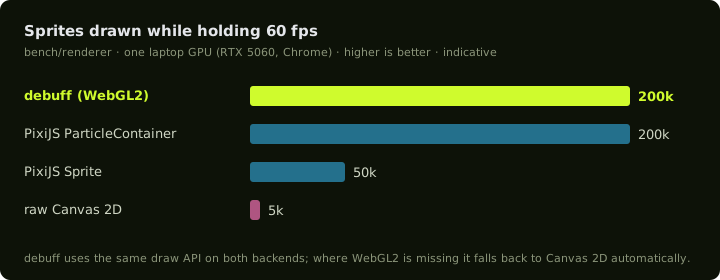
What you'd otherwise write yourself
Every canvas game grows the same plumbing. debuff ships it as small, tree-shakeable packages, so you pay only for what you import:
- A loop that behaves. A fixed-step simulation with interpolation, a seeded RNG, pause when hidden, hit-stop, time scale, and reduced-motion support.
- Crisp scaling. Fit or integer scaling, devicePixelRatio changes, and GPU context loss and restore.
- Fast drawing. Sprites, text, shapes, clipping and blend modes in one batched API. Up to 8 textures are bound per batch, and the hot path doesn't allocate.
- Input that doesn't miss taps. Keyboard, pointer, touch and gamepad with per-step pressed and released edges, plus action bindings.
- Audio that starts. Web Audio buses, autoplay unlock and a small parametric synth for jam-speed sound effects.
- Assets without a pipeline to maintain. A manifest is generated for you, sprite atlases are packed automatically, and only the files you reference ship.
- Levels. Import from Tiled and LDtk, with culled rendering and tile collision, including one-way platforms.
- Feel. Tweens, particles and squash-and-stretch.
Find out what's wrong, fast
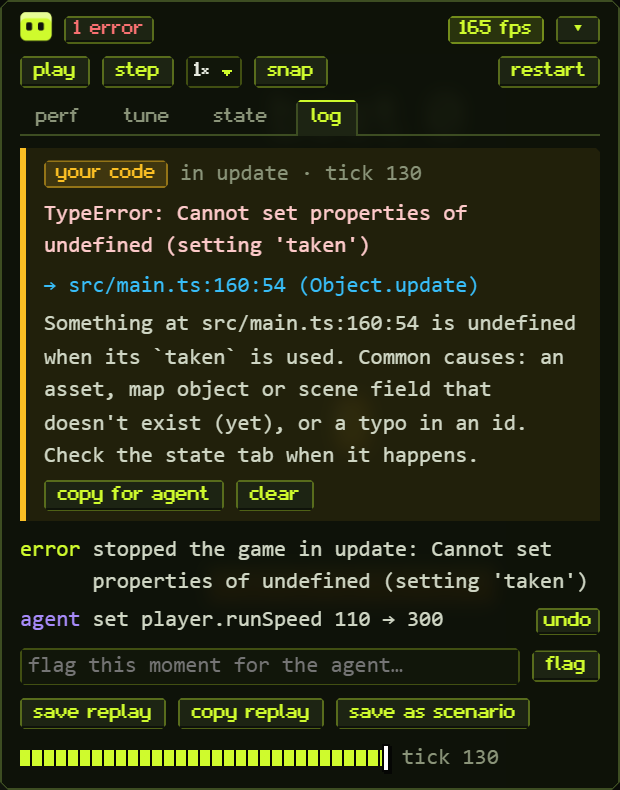
When something throws, the dev panel says whose problem it is:
- Your code: the panel links the source line (it opens in your editor) and suggests a fix.
- A call debuff rejected: the panel explains what debuff expected.
- A bug in debuff itself: the panel gives you a prefilled report, so you're not left guessing.
Repeats are counted instead of flooding the log, and when the game stops, the error is marked as the reason. Fix the cause, press play, and the game resumes from where it stopped.
Tune it while you play
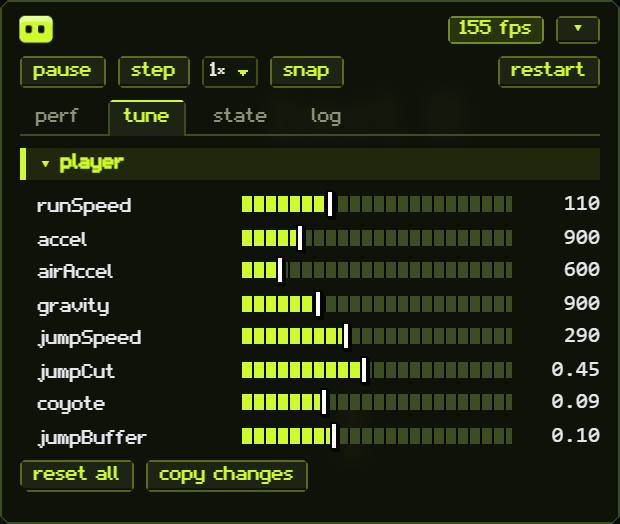
Declare typed params (runSpeed, gravity, coyote…), and they become live sliders. Values you've changed turn amber, any change can be undone, and copy changes copies just your tuning back into code. Agents and test scenarios use the same params, so feel tweaks stay reproducible.
Know where every frame goes
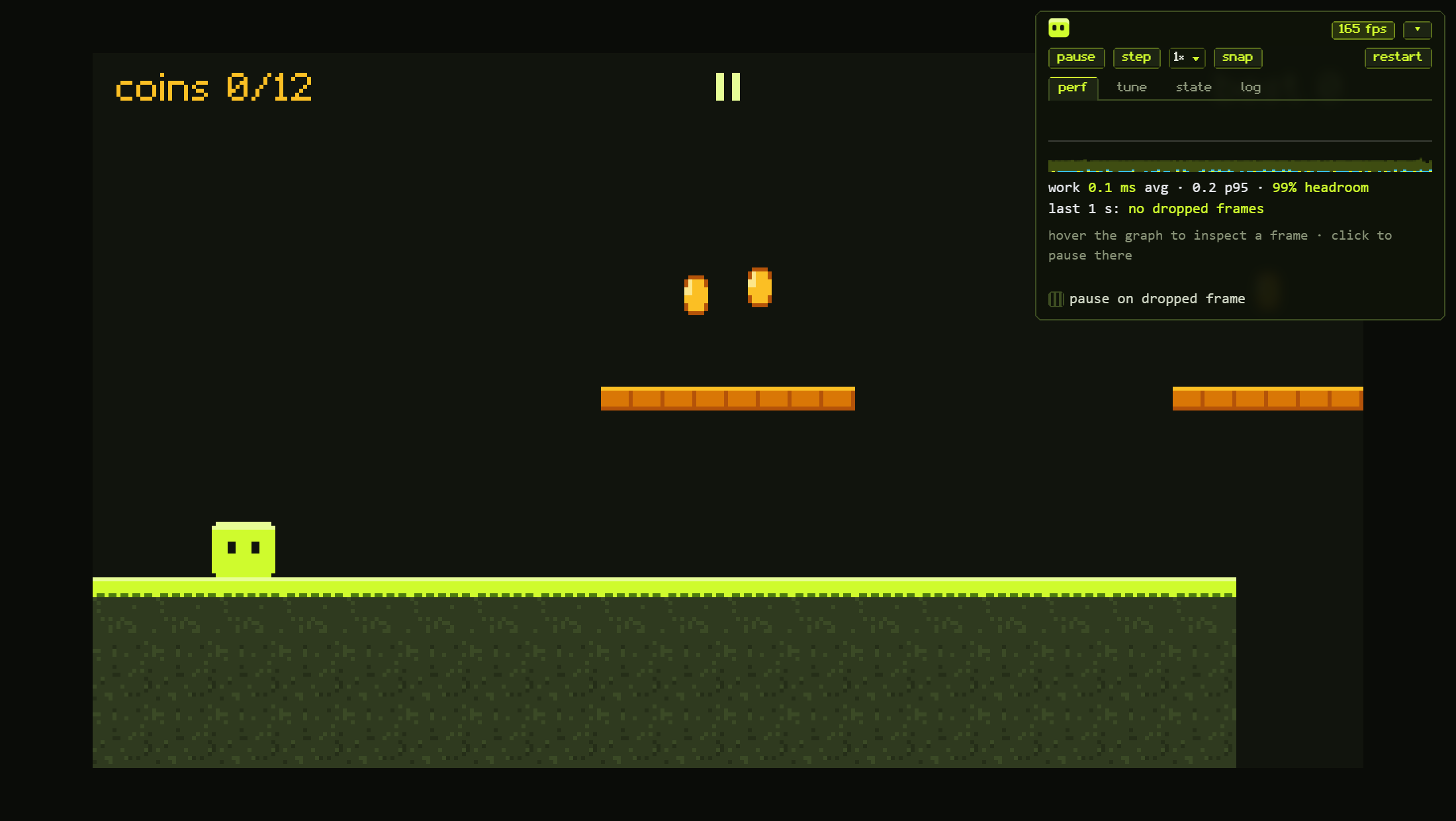
The perf tab shows your headroom and splits each frame into update and render time. It also tells you whether a dropped frame came from your code or from outside it (GC, the browser, another tab). Click a bar to freeze on that frame. Pause, step one tick at a time, or play in slow motion. The state tab shows your scene's live data next to the game.
Built for agents, led by you
debuff gives agents evidence instead of guesswork. The @debuffjp/mcp server lets an agent like Claude Code:
- play the game you have open. It presses keys, steps time and reads state. Every action shows in your panel, and you can undo it.
- read your notes. Type "jump feels floaty here", and the agent gets the note along with the game state at that moment.
- read explained errors and frame breakdowns. These are the same data you see in the panel.
- verify with deterministic scenarios. Scenarios are JSON scripts with screenshot baselines, so a fix can be checked rather than just claimed.
Creative calls stay with you. The tools are built so agents propose and you decide.
Ships small, stays honest
debuff build reports raw, gzip and brotli size for every file, and fails if dev tooling leaks into what players download. The starter game is 12.9 kB brotli. Production builds open with a short "made with debuff" card. Any key skips it, and splash: false removes it (do that for Poki, which doesn't allow splash screens; see Publishing).
When debuff isn't the right tool
debuff is for small, polished 2D web games: jams, instant-play portals and prototypes. If you need 3D, a visual editor, or a full physics engine, a larger engine will serve you better. debuff plays well next to them (it's just ES modules on a canvas), but it won't pretend to be one.