

Raycasting with a sprite renderer
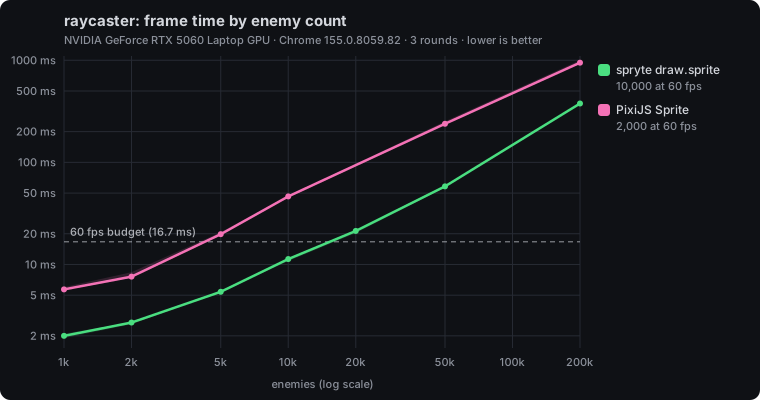
Drawing a Wolfenstein-style maze as 2D strips turns out to be one of the hardest tests for a sprite renderer. In 2dbench, spryte held 10,000 enemies at 60 fps and PixiJS held 2,000, on one RTX 5060 laptop in Chrome.
A raycaster is the technique behind Wolfenstein 3D: a flat grid map, one ray per screen column, and walls drawn as vertical strips whose height depends on distance. There's no 3D geometry. Every frame is a pile of thin rectangles, each showing one column of a texture.
That makes it a natural fit for a 2D sprite renderer, and a surprisingly good way to find out how a renderer is built. We added a raycaster scene to 2dbench, our open renderer benchmark, and this post walks through how it works and what it measured.
The scene
The scene is a fixed 24×24 maze: solid rock with a circular corridor, a central room and eight radial passages. The camera walks the ring, looking along its path and slightly inwards. Enemies (squish blobs with two dot eyes) are scattered in the empty cells and wander a little.
Every texture lives in one atlas canvas, drawn in code so it's identical everywhere: nine 64×64 tiles holding four wall styles, four enemy colours, and a white tile used for the floor and ceiling.
Like every 2dbench scene, the split is strict. The shared simulation does all the game work (casting rays, shading, projecting and depth-clipping enemies) and writes the result into plain typed arrays. Adapters only draw those arrays. So every library does exactly the same work by construction, and the benchmark measures drawing, not someone's raycasting code.
Casting 480 rays
The canvas is 960×540. Each wall slice is 2 pixels wide, so the scene casts 480 rays per frame. Each ray steps through the grid with DDA (stepping to whichever grid line is nearer, x or y, until it hits a wall cell):
for (let guard = 0; guard < 64 && cell === 0; guard++) {
  if (sideX < sideY) {
    sideX += ddx;
    mx += stepX;
    side = 0;
  } else {
    sideY += ddy;
    my += stepY;
    side = 1;
  }
  cell = this.map[my * 24 + mx] ?? 1;
}
The hit gives three things: the distance, which wall style was hit, and where along the wall the ray landed. That last value picks the texture column, texX, from 0 to 63. The slice is then one source pixel wide and 64 tall, stretched to 2 pixels wide and HEIGHT / dist tall on screen.
The distance also goes into a z-buffer, one entry per column, which the enemies need later.
Shading with tint
Old raycasters darken distant walls, and darken one wall orientation so corners read clearly. Here that's a single multiplier:
const shade = Math.min(1, 2.2 / (1 + dist * 0.3)) * (side === 1 ? 0.8 : 1);The shade becomes the slice's tint colour. No extra textures, no shader tricks: just per-sprite tint, which any sprite renderer worth using already has.
The floor and ceiling use the same idea. They're 12 bands each, drawn from a small patch of the white tile and tinted darker towards the horizon. That's 24 quads, plus 480 wall slices, before a single enemy appears.
Billboarded enemies, clipped column by column
Enemies are billboards: flat sprites that always face the camera. The classic way to draw them in a raycaster is also the way here.
- Move each enemy and measure its squared distance to the camera.
- Sort far to near, so nearer enemies draw over farther ones.
- Project each one into camera space. Anything behind the camera (or too close) is skipped.
- Work out its screen position and size, then walk its columns. For each 2-pixel column, if the enemy is farther than the wall in the z-buffer, skip that column. Otherwise draw a one-texel-wide slice of the enemy tile.
for (let col = first; col <= last; col++) {
  if (ty >= (this.zBuffer[col] as number)) continue;
  const texX = Math.floor(((col * STRIP + 1 - left) / size) * TILE);
  if (texX < 0 || texX >= TILE) continue;
  this.capacity(n + 1);
  this.emit(n++, col * STRIP, top, STRIP, size, tile * TILE + texX, 0, 1, TILE, shade);
}
This is how an enemy can be half-hidden behind a corner with no depth buffer on the GPU. Visibility is decided per column, in JavaScript, before anything is drawn.
It also means one enemy isn't one sprite. A nearby enemy covers many columns, so it becomes many slices. The benchmark's load dial is the number of enemies in the maze, and the number of quads that produces changes every frame.
Why it's a stress test
Most sprite benchmarks draw the same texture again and again. The bunnymark is the classic example: one image, many positions. Renderers can get very fast at that, and some have dedicated bulk paths for it.
The raycaster is the opposite. Every quad is a thin slice, and nearly every one comes from a different region of the atlas: a different wall column, a different enemy column. There are thousands of them per frame, each with its own size and tint.
That isn't exotic. It's the same shape of work as sprite-sheet animation (every character on a different frame of the sheet) and tile maps (every tile a different cell of the atlas). The raycaster just pushes it to an extreme. If a renderer pays a cost per change of source rectangle, this scene finds it.
How each library draws part of an image
In 2dbench, slice scenes describe each quad with a source rectangle in texture pixels (sx, sy, sw, sh), a drawn size (w, h) and a top-left position. Each adapter turns that into its library's idiomatic calls.
spryte draws part of an image with a Frame: an object holding an image and a rectangle. draw.sprite reads it immediately and doesn't keep it, so the adapter reuses one Frame object and changes its rectangle for every slice. Nothing is allocated per slice:
const frame = { image: textures[0] as HTMLCanvasElement, x: 0, y: 0, w: 1, h: 1 };
const slice = { origin: [0, 0] as const, scaleX: 1, scaleY: 1, tint: 0xffffffff };
// ...per slice:
frame.x = s.sx[i];
frame.y = s.sy[i];
frame.w = s.sw[i];
frame.h = s.sh[i];
slice.scaleX = s.w[i] / frame.w;
slice.scaleY = s.h[i] / frame.h;
slice.tint = s.color[i];
draw.sprite(frame, s.x[i], s.y[i], slice);
spryte is an immediate-mode renderer, so a source rectangle is just four numbers that go into the instance data for that quad.
PixiJS is a retained-mode scene graph. Its way to draw part of an image is a Texture with a frame rectangle on a shared source. The adapter caches one Texture per distinct source rectangle, so it never creates the same one twice. It also keeps a pool of Sprites on the stage: each frame it sets the first count sprites' texture, position, size, tint and alpha, hides the rest, and calls application.render(). The app runs on PixiJS 8's WebGL renderer, with roundPixels on, no antialiasing and the ticker off.
This is the idiomatic setup, and the adapter says so in its setup string, which goes into every report. The PixiJS adapter's source also invites maintainers to open a PR if there's a more idiomatic or faster setup. We'd genuinely like to hear it.
Why bulk paths and Canvas 2D sit it out
2dbench has two bulk adapters: spryte's draw.sprites and PixiJS's ParticleContainer. Both are far faster than their general-purpose paths on the bunnymark. Neither runs the raycaster, for the same reason: they share one texture region across every copy in the call, and this scene needs a different region per quad. Forcing them in would mean a different benchmark, not a fairer one.
Canvas 2D drawImage can draw sub-rectangles, but it can't tint per draw, and the shading depends on that. So it sits this one out too.
That leaves the two general-purpose paths, spryte draw.sprite and PixiJS Sprite, which is the comparison a game would actually face.
Results
We ran the scene for 3 rounds on one machine: a laptop with an AMD Ryzen 7 260 and an NVIDIA GeForce RTX 5060 Laptop GPU, Chrome 155, Windows, on AC power. Each count gets 20 warm-up frames and 100 measured ones. Each frame is timed from simulation to GPU completion (a 1-pixel readback), so vsync can't hide cost. We take the median per count per round, then the median across rounds.
Before timing, both adapters passed the parity gate against the PixiJS reference: 100% coverage and 0% of pixels differing inside sprites at 2,000 and 50,000 enemies. They draw the same picture.
| Adapter | Version | Max enemies at 60 fps | 10k | 50k | 200k |
|---|---|---|---|---|---|
spryte draw.sprite | 0.1.0 | 10,000 | 11.3 ms | 58.2 ms | 377.1 ms |
PixiJS Sprite | 8.22.0 | 2,000 | 46.4 ms | 238.7 ms | 946.6 ms |
At 10,000 enemies, spryte takes 11.3 ms a frame and PixiJS 46.4 ms, about 4.1×. spryte holds 60 fps up to 10,000 enemies; PixiJS up to 2,000.
The results also record main-thread time before the GPU sync. At 10,000 enemies that's 8.7 ms for spryte and 40.2 ms for PixiJS. Almost all of the gap is on the CPU, in JavaScript, not on the GPU.
What it reveals
PixiJS isn't doing anything wrong here. The cost is the cost of its model.
In a scene graph, each slice is a Sprite object. Every frame, each one has a texture swapped, properties set, and then the renderer walks the stage, updates transforms, and collects each sprite into a batch. Retained mode pays off when most things stay the same between frames. In a raycaster, almost nothing does.
spryte is immediate mode. A slice is a call: four numbers for the source rectangle, a position, a scale and a tint, written straight into a GPU buffer. There's no object per slice to update or traverse, and changing the source rectangle costs the same as not changing it.
The broader lesson for renderer design is that "draw part of an image" deserves to be cheap. Sprite sheets and tile atlases are how most 2D games are made, and in both, neighbouring quads usually come from different regions. A renderer that makes the source rectangle a per-call value, rather than a property of a long-lived object, handles that for free. We wrote more about how spryte's hot path got this way in How spryte got fast.
Caveats
These are results from one machine, a fast desktop-class GPU in a laptop. Compare them as ratios within the table. On phones, filling pixels often dominates, and the gap may look different. The raycaster hasn't been run on our phone set yet.
The scene is also one design among many. A real raycaster game might draw walls with a custom shader, or render enemies as whole sprites with a GPU depth test. 2dbench deliberately limits itself to what a 2D sprite API can do, because that's what it measures.
If you have a different machine, or a better PixiJS setup, 2dbench takes results and pull requests. node run.mjs raycaster runs this scene.